
Triage inbound email
Review sender policy, attachments, priority, and next actions before invoice processing continues.
Find the message that needs review
The Emails workspace groups messages into conversations. Search by sender, subject, or visible message details, or open Queues to focus on a saved view. Status and warning labels explain why a conversation needs attention.
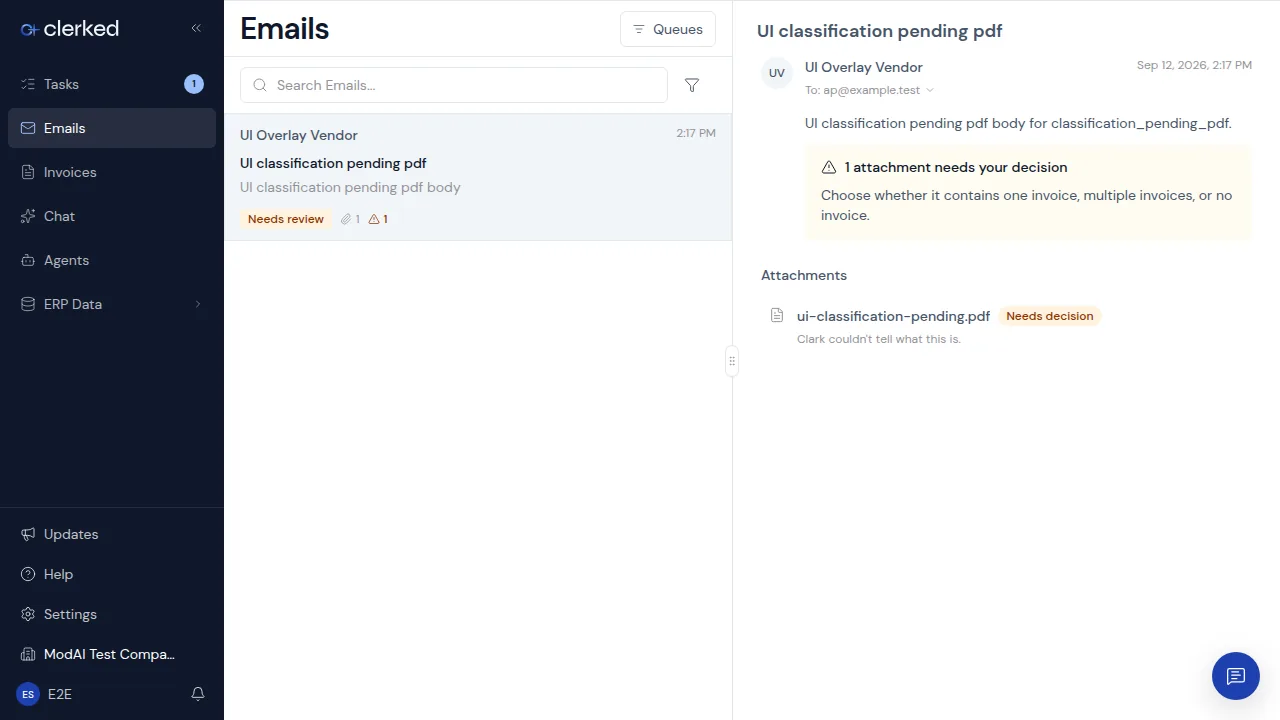
Review the conversation
-
Read the sender and conversation. Confirm who sent the message, what they asked for, and whether the thread contains earlier context. When Clerked asks for a sender decision, trust or block the exact address or its domain. The conversation stays open while Clerked applies the choice and shows an inline error if it cannot finish.
-
Review every attachment that needs attention. An automatically analyzed attachment can be processing, need a decision, or be resolved. Open anything that needs a decision and choose Not an invoice, This is an invoice, or These are multiple invoices based on the document. An attachment that your company chose not to analyze automatically stays available for an optional manual decision without creating a task.
-
Review an existing vendor reply when shown. Email analysis classifies attachments and can fill your company’s configured email tags or folders; it does not draft replies. If a saved reply is awaiting your review, check the recipient and message. Depending on the mailbox connection and your assignment, you can send it, mark an externally sent reply as sent, dismiss it, or copy it into your email client.
-
Confirm the status changed. A resolved conversation moves out of the review queue. If processing failed, use the available retry action once. If the reason remains unclear, contact support with the visible conversation status and attachment name.
Understand the status
- Processing means Clerked is still working.
- Needs decision means a person must choose the next action.
- Processed means the message no longer needs review.
- Blocked means an explicit sender rule or a failed forwarding check stopped processing. Use the available Reprocess action after the underlying forwarding problem is corrected.