
Navigate Clerked
Find day-to-day work, configuration, notifications, updates, and help from the current navigation.
Primary workspaces
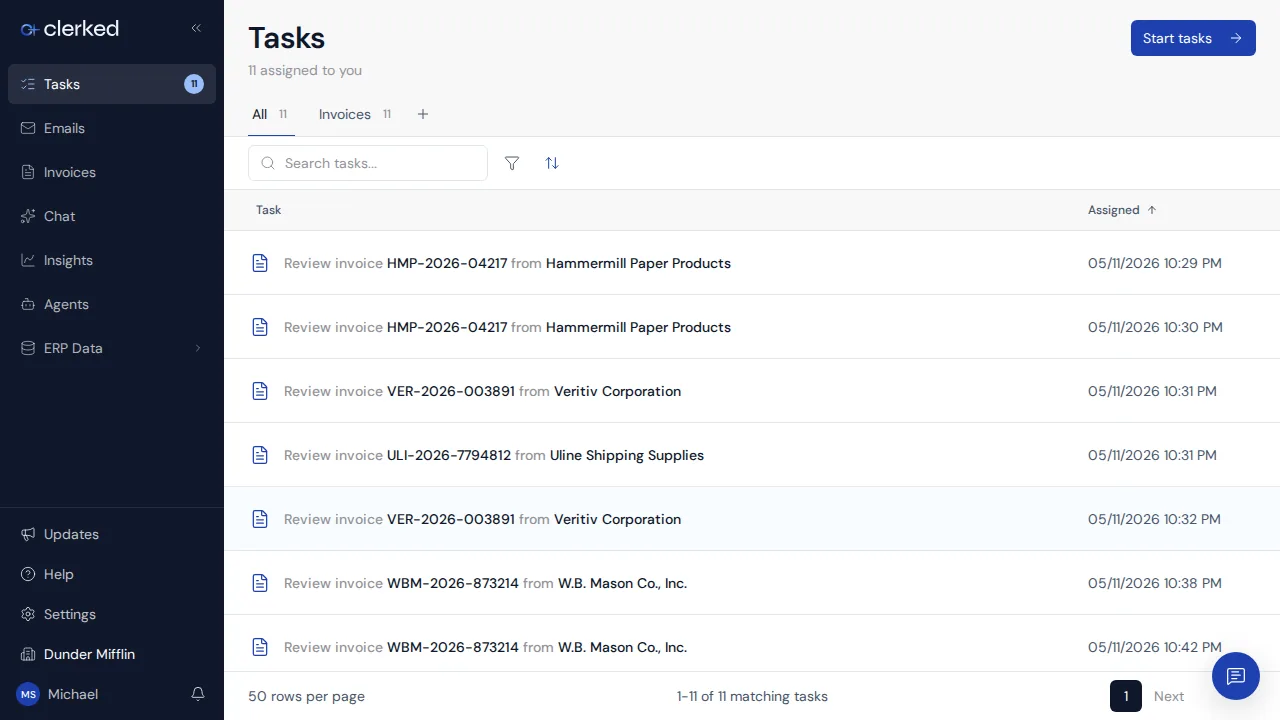
The left sidebar keeps your main work in one place:
- Tasks collects invoice and email work that needs a person, including failed-export recovery.
- Emails shows invoice conversations and attachments sent to Clerked.
- Invoices is the complete invoice list and review workspace.
- Chat opens Clark when it is available for your company.
- Insights explains spend, commitments, and process health for the scope you can view.
- Agents shows the built-in Invoice Processing and Email Processing agents. Custom definitions appear only when your company has access.
- ERP Data opens reference records synchronized from connected systems.
Account and configuration
Select your name at the bottom of the sidebar to open your account menu. Use Settings for your profile, notifications, password, organization access, and company configuration. You will only see settings that your role can manage.
If you work across companies, use the company chooser near the bottom of the sidebar before reviewing records or changing company settings. The current company affects the records, fields, and controls you see.
Updates and help
Open Updates for recent product changes and Help for this Help Center. If a workspace is missing, first check the current company. Then ask an administrator to confirm your role and company assignment.
Announced in Meet Clark.